

 Free and open source, by P4 Software
Rotula: free ZPL label designer for Windows
Rotula is a Windows program from P4 Software for designing ZPL labels. Add barcodes, merge data from Excel or a database, and print to Zebra and other ZPL printers. No account, no subscription, no telemetry.
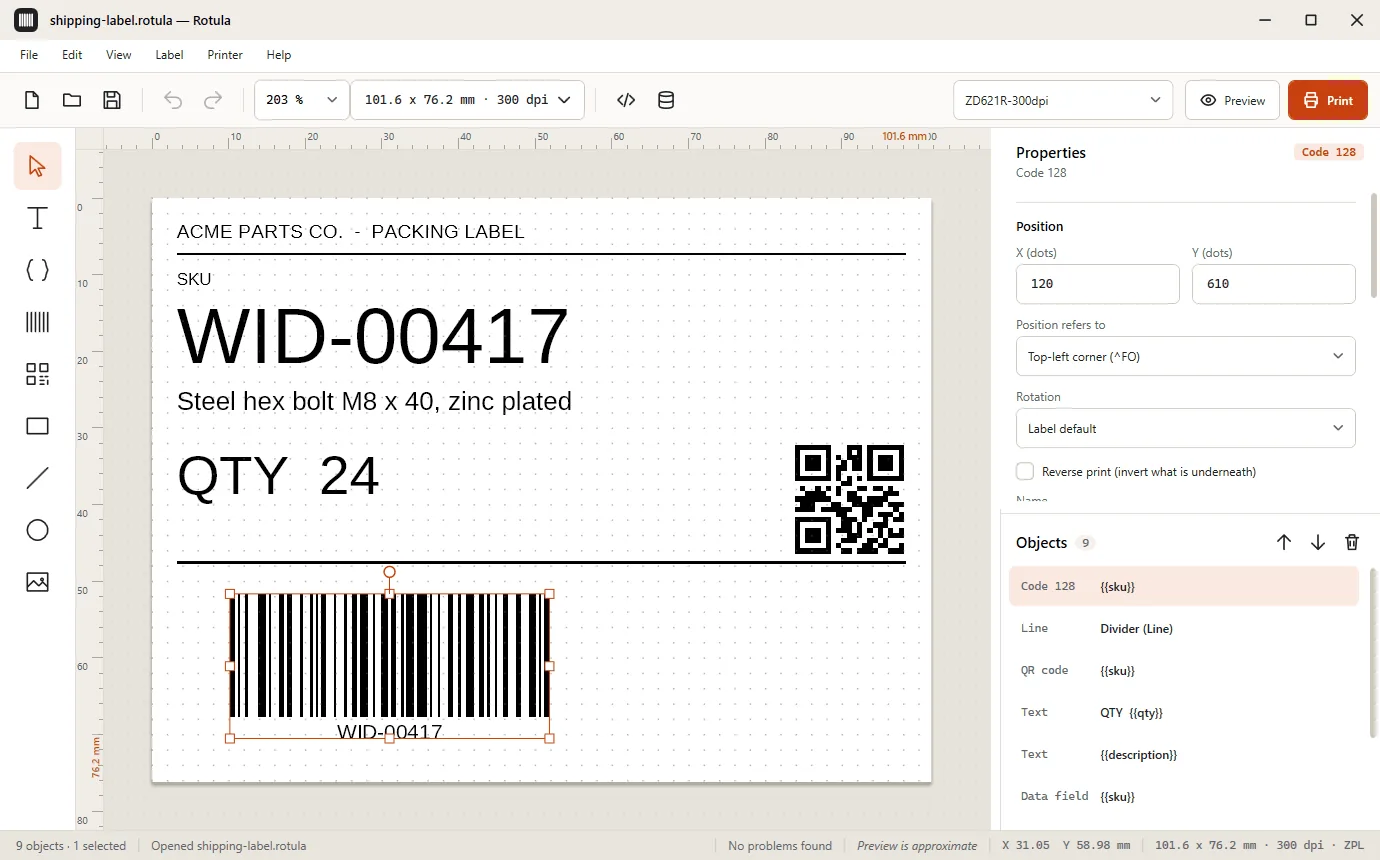
Design, merge and print ZPL labels in one program
Rotula is a desktop designer for people who print on Zebra and other ZPL printers and do not want a license server, an account or a subscription to do it.
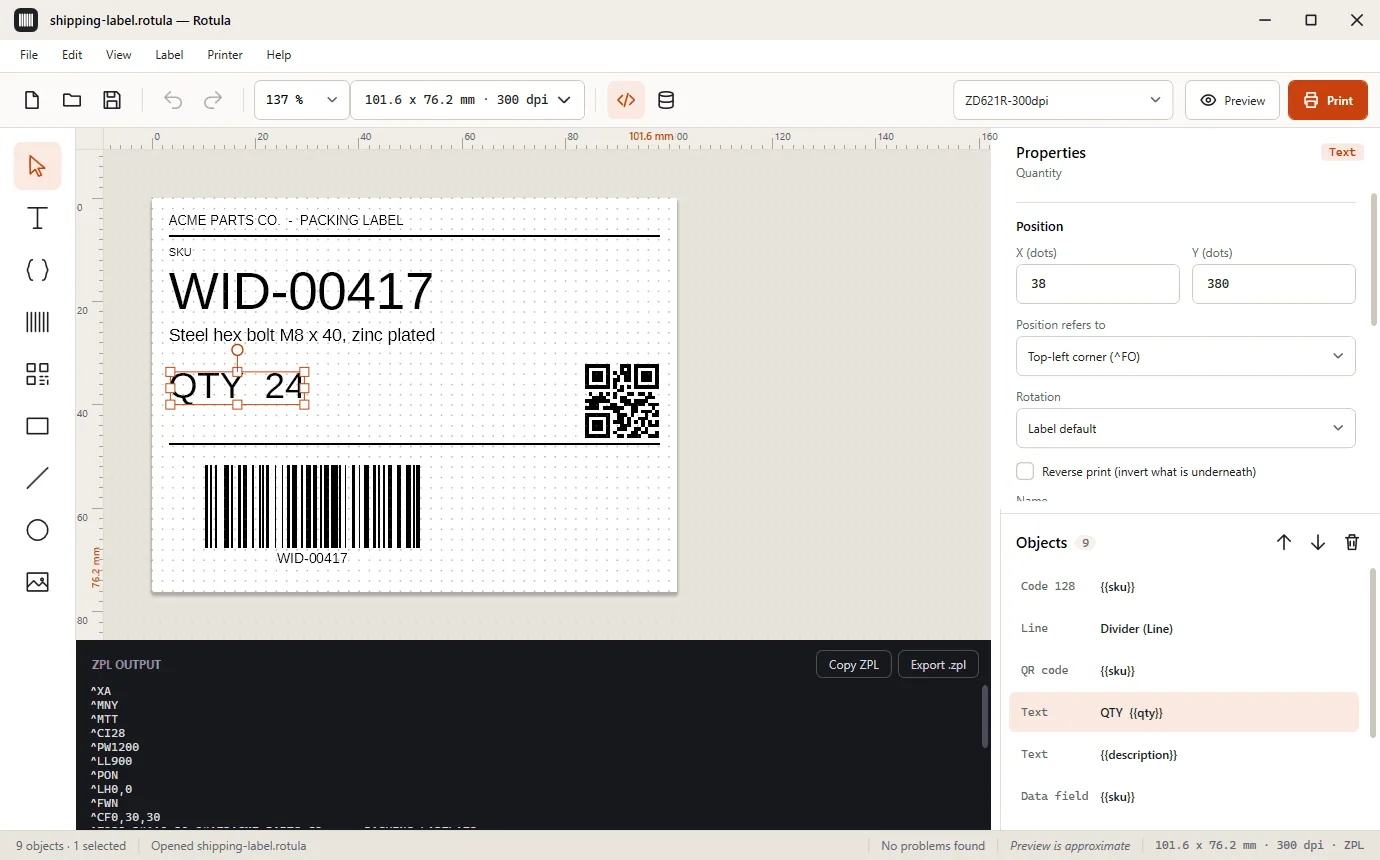
Design the label and read the ZPL
A canvas with rulers in millimeters, inches or dots, a grid, snapping, multi-select, align and distribute, and unlimited undo. Add text, wrapped text, data fields, barcodes, QR codes, boxes, lines, circles and monochrome images.
The ZPL panel shows the exact code the printer will receive, with Copy and Export .zpl buttons. The same label and data always give the same plain-ASCII ZPL, so you can keep it in version control or send it with any other tool.
The on-screen preview is approximate because text is drawn with a stand-in typeface. Always print a test label first.
Barcodes that check themselves
Rotula writes and reads 28 ZPL barcode commands: linear, 2D, stacked and postal. Each one validates your data as you type, so a wrong EAN-13 check digit or a character that Code 39 cannot encode is reported in plain language, with what to do next. Builders for QR content and GS1 identifiers help you fill in web addresses, Wi-Fi details, contact cards and more.
| Symbology | Typical use |
|---|---|
| Code 128 | Logistics, shipping, general purpose |
| Code 39 | Industrial and inventory labels |
| EAN-13 and UPC-A | Retail products |
| Interleaved 2 of 5 | Cartons and logistics |
| QR Code | Web addresses, contact data, any text |
| Data Matrix | Small parts, electronics |
| PDF417 | Documents, tickets, ID cards |
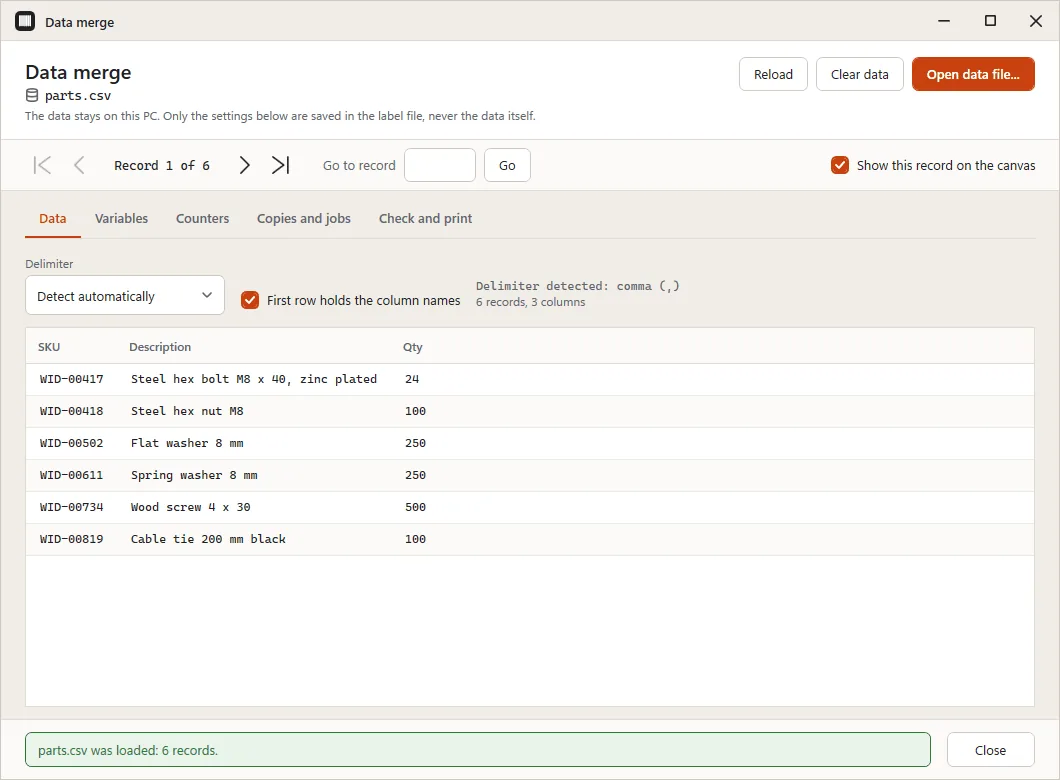
Merge data from Excel, CSV and databases
Load a CSV or Excel (.xlsx) file, or run a read-only query against SQL Server, PostgreSQL, MySQL and MariaDB, SQLite or any ODBC source. Map columns to {{variables}}, choose the copies per record, select the records to print, check them for problems and print the whole batch.
Only the merge settings are saved in the label file, never your data. Database passwords are stored protected by Windows, and only a single SELECT statement is ever accepted.
Print to Zebra and other ZPL printers
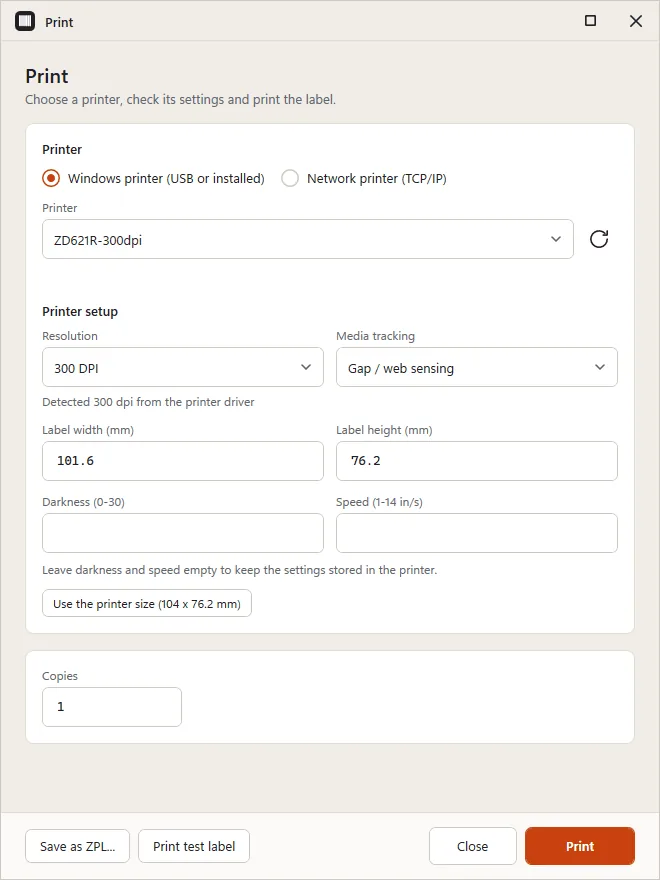
Print to any printer installed in Windows, including USB printers through their driver, or straight to a network printer on TCP port 9100. Rotula reads the printer's resolution (203, 300 or 600 dpi) and paper size from the driver, and converts a label to the printer's resolution while keeping its physical size.
The Print dialog can send a test label first, lists the records you selected and says in plain language what went wrong if a printer is offline or refuses the connection.
Everything else in the box
-
Variables and counters
Type
{{sku}}in any text or barcode to make it a variable. Add serial-number counters with start, step, padding, prefix and suffix, dates that work out their own value, and questions that are asked at print time. -
Import the ZPL you already have
File > Import ZPL reads existing ZPL II into an editable design. Commands Rotula does not interpret are kept as raw ZPL and still sent to the printer, and anything approximated produces a warning that names the line.
-
Label stock library
Type a manufacturer part number or a size in almost any spelling, such as 4x6 or 100x150mm, and Rotula sets the label size and media type. Save your own sizes or import a supplies list from CSV or Excel.
-
Export ZPL, PNG, JPEG and PDF
Save the label as a ZPL file, or export it as an image or PDF. Labels are stored as plain, versioned JSON files, so there is no lock-in.
-
English and Spanish
The interface and the installer are available in English and Spanish. Rotula follows the Windows language by default and you can switch at any time, with no restart.
-
Optional MCP server
A separate program,
Rotula.Mcp.exe, lets MCP-capable AI clients create, validate and preview labels. Printing and database access stay off until you switch them on, and printing needs a two-step confirmation.
Who Rotula is for
- Warehouses and distribution. Shipping, pallet and location labels with Code 128 and GS1-128 barcodes, printed from a spreadsheet.
- Laboratories. Sample and specimen labels with Data Matrix or Code 128 codes and serial numbers.
- Retail. Shelf and product labels with EAN-13 and UPC-A, filled in from a price list.
- Manufacturing. Part, asset and serial-number labels, with the counters remembered between sessions.
- Small teams with a Zebra printer. A free way to design and print labels without buying a license for every desk.
- Label designers and developers. Import ZPL, edit it visually, read the generated code, diff it and keep it in version control.
How it works
-
Install
Download the signed installer, or unzip the portable build. No administrator rights are needed.
-
Design or import
Pick a label size from the stock library, add text and barcodes, or import the ZPL you already use.
-
Merge and print
Load your spreadsheet or database, print a test label, then print the batch.
Rotula and paid label software
An honest comparison of what Rotula is next to commercial label design suites such as BarTender, NiceLabel and ZebraDesigner. Those products are mature and cover much more ground, so this is about where Rotula differs, not about who is better.
| Aspect | Rotula | Commercial suites |
|---|---|---|
| Price | Free, MIT license | Commercial licenses; some offer a free or limited edition |
| Account or activation | None | Varies by product and edition |
| Source code | Open, on GitHub | Proprietary |
| Printer output | ZPL (ZPL II compatible printers) | Typically many printer languages and drivers |
| Data sources | CSV, Excel and read-only database queries | Typically databases, ERP and other integrations as well |
| Platform | Windows 10 and 11 | Varies by product |
If you need RFID, writing back to databases, central management, other printer languages or a vendor support contract, a commercial suite is the better fit today. If you need to design a ZPL label, merge a spreadsheet and print without installing a platform, Rotula is made for that. Zebra, ZebraDesigner, BarTender and NiceLabel are trademarks of their respective owners. Rotula is not affiliated with or endorsed by them.
Works with
-
Zebra and other ZPL printers
Rotula writes ZPL II, so it works with Zebra printers and other ZPL-compatible printers, over USB through the Windows driver or over the network on port 9100. It is tested against decoders and reference files, not against every printer model, so print a test label first.
-
LabelScope, a virtual ZPL printer
LabelScope is another free, MIT-licensed tool from P4 Software. It acts as a virtual Zebra printer for Windows, so you can see what a ZPL label looks like on screen and spot problems without a printer or a roll of labels. LabelScope on GitHub
-
logisticaHQ
logisticaHQ is P4 Software's cloud warehouse management system. It generates labels and shipping documents as part of picking and packing. Rotula is a separate, free tool for labels you design and print on your own. About logisticaHQ
Download, install and verify
System requirements
- Windows 10 version 1809 or later, or Windows 11, 64-bit.
- No separate .NET install: the release builds are self-contained.
- To print: a ZPL-compatible printer installed in Windows (USB or network), or reachable on TCP port 9100.
Two ways to install
- Installer. Installs for your user only, adds a Start menu entry and needs no administrator rights.
- Portable zip. Unzip anywhere and run it. Nothing is installed.
Check what you downloaded
- The installer is code-signed. Right-click it, choose Properties and open the Digital Signatures tab. The signer shown is Barrdega Sistemas NA LLC.
- Every release carries a
SHA256SUMS.txtfile to compare with the checksum of your download. - A new release of a small project can still trigger the Windows SmartScreen warning while it builds reputation, even when the signature is valid. Check the publisher name, then choose More info and Run anyway.
Open source and private by design
- MIT license. Use Rotula at home, at work, in a warehouse or inside a product. There are no seats and no tiers. Read the license.
- No telemetry. No analytics, no update checks and no account. Rotula connects only to the printer and the databases you point it at.
- Your files stay yours. Labels are plain JSON and ZPL is plain text. Your data file is never stored in the label.
- Built and maintained by P4 Software in Panama City. Bug reports, ZPL samples that import badly and pull requests are welcome on GitHub.
More free label tools
Need a barcode or a label right now, without installing anything? These web tools run in your browser.
-
Barcode generator
Create a barcode image in your browser. Open the barcode generator
-
LPN and SSCC label generator
Make pallet and license plate labels for your warehouse. Open the label generator
-
ZPL label designer in your browser
Lay out a label visually and copy ready-to-print ZPL. Open the ZPL label designer